

Authored by Tim Good | Senior Manager & Christian Schaefer | Manager
Finance leaders are under mounting pressure to get results from AI quickly. But at the enterprise level, AI initiatives are often too vague, too slow, and don’t connect to real business results.
In fact, most enterprise AI initiatives have failed. 95% of AI projects in 2025 never made it past the pilot.
Finance teams feel that pain more than most. They’ve invested in automation, but forecasting in Oracle EPM still takes days of manual effort — only to go back to the drawing board after consolidation and review.
That’s where Oracle Intelligent Performance Management (IPM) comes in. Built into Oracle Cloud EPM, it uses AI, machine learning, and predictive modeling through Advanced Predictions and Insights to automate your forecasting process, all within the tools you already use.
Why Start with IPM?
Enterprise AI initiatives often stall because they’re expensive, disruptive, and slow to show value. Oracle IPM gives you a faster, lower-risk way to put AI to work.
Here’s why we recommend IPM to finance teams:
- No new cost or license. If you have an Enterprise subscription to Oracle Cloud EPM, IPM is already included — no additional spend required.
- No rebuild or downtime. IPM plugs into your existing forecasting setup, so you can run AI-powered predictions in parallel and see results quickly.
- Low risk, high impact. Built on Oracle Cloud EPM, IPM lets you test, refine, and scale AI adoption without disrupting current processes.
- Fast time to value. Even for large enterprises, implementations can be completed in as few as 90 days, delivering tangible results fast.
IPM gives finance leaders a practical, cost-effective way to test AI, prove the potential, and build momentum for broader adoption.
How to Implement IPM: The 90-Day Pilot
We recommend starting with a 90-day pilot rather than a “big bang” approach. This allows your team to familiarize themselves with IPM’s capabilities in a low-risk setting. By the end of 90 days, your team will generate baseline forecasts instantly and apply GenAI for data analysis, freeing up their time for higher-value work.
A successful pilot generally follows three key phases:
- Identify and prepare key data sets
- Configure advanced predictions and insights
- Iterative testing, improvement, and expansion
Once you’re comfortable with the results of the predictions, you can quickly scale the scope of the automated predictions to other business areas.
Phase 1: Identify and Prepare Key Datasets
Every IPM pilot should start with a clear, measurable goal agreed upon by leadership. Is the goal an increase in forecast accuracy? If so, what percentage increase? Do you have a baseline accuracy from the past two years? Before design begins, the team should establish a shared vision of what success looks like for IPM.
Once goals are set, identify the right data sets for predictive forecasting and generative insights. You want to start where IPM can make the biggest impact.
A few things to look for when selecting your pilot data sets:
- Significant effort to forecast: Areas that require a lot of time-consuming, manual work each cycle.
- Regular forecast misses: Accounts, regions, or segments with frequent inaccuracies.
- Sufficient historical data: At least twice the number of periods you plan to predict (e.g., 24 months of history for a 12-month forecast).
- High-value segments: Regions or business units where improvements in accuracy will drive the most financial impact.
For even better results, identify additional variables that correlate to your data set’s outcomes. For instance, if an expense correlates strongly with headcount, include headcount as a predictive driver. IPM’s Advanced Predictions will recognize these relationships and improve forecast accuracy over time.
Phase 2: Configure Advanced Predictions and Insights
With goals and data sets in place, it’s time to start building your predictions. The best part of IPM is that it’s already embedded within Oracle Cloud EPM and ready to use. Minimal configuration means no integrations, no new workflows, and no disruption to existing forecasts.
Start by creating the metadata to house your IPM forecasts. For example, add a “Forecast IPM” member to the Scenario dimension, along with any archive versions that mirror your traditional forecast setup. This allows side-by-side comparisons later in Phase 3 without impacting existing data.
With the metadata in place, you’re ready to configure an Advanced Prediction job in IPM following these steps:
- Define your calendar: Identify historical periods for the predictive model to analyze and define the time horizon for the prediction.
- Configure events (optional): Inform the model of events that may impact predictions. For example, COVID-19 may have skewed revenue data significantly. Create a “skip” event for COVID-19, so the periods defined for that event are not factored into historical trend analysis.
- Create the prediction: Create a new job and select Advanced Prediction under the Generate Prediction menu. Give your prediction a name (avoid special characters!) and add an optional description.
- Select a slice of historical data: Identify a POV and choose Account that you’d like to predict. Include additional accounts as drivers to enhance prediction accuracy.
- Set a future data slice: Identify a POV for predicted data (for example, “Forecast IPM” Scenario). The accounts and drivers should carry over from the historical data selection.

- Prepare data selections: Choose how to treat missing and outlier values for selected drivers. This is a particularly crucial step to ensure data is complete when fed to the machine learning model. IPM offers several choices to account for distinct types of data (numeric or Smart List).
- Set model parameters: Select the ML model to use, or allow Oracle to score various models and select the best outcome by choosing Oracle AutoMLx. The forecast error metric is used to score each ML model’s output and will determine which should be used to predict your data. Each of these ML models and error metrics are suited for specific use cases – this is where familiarity with data science and ML model training comes in hand.
This phase brings your first forecasts to life quickly, without interrupting your existing forecasting process.
Phase 3: Iterative Testing, Improvement, and Expansion
The final phase of the IPM pilot focuses on testing and validating predictive models and can be separated into two testing cycles: back testing and parallel testing.
Back testing involves running IPM predictions on prior periods and comparing the results to historical actuals and forecasts. This helps quantify the value directly attributable to IPM predictions. Establish a repeatable procedure for back testing and document results against existing forecasting benchmarks. Smart View analyses and visualizations in Excel can be very helpful here, due to the iterative nature of testing.
Once you’ve identified the most accurate prediction configuration, move to forward-looking parallel testing. Run IPM predictions alongside existing manual forecasts to gauge the accuracy of each forecast cycle. A 90-day pilot will include at least one quarterly forecast cycle. If a longer parallel testing period is preferred, simply continue running both the IPM predictions and manual workflows in tandem.
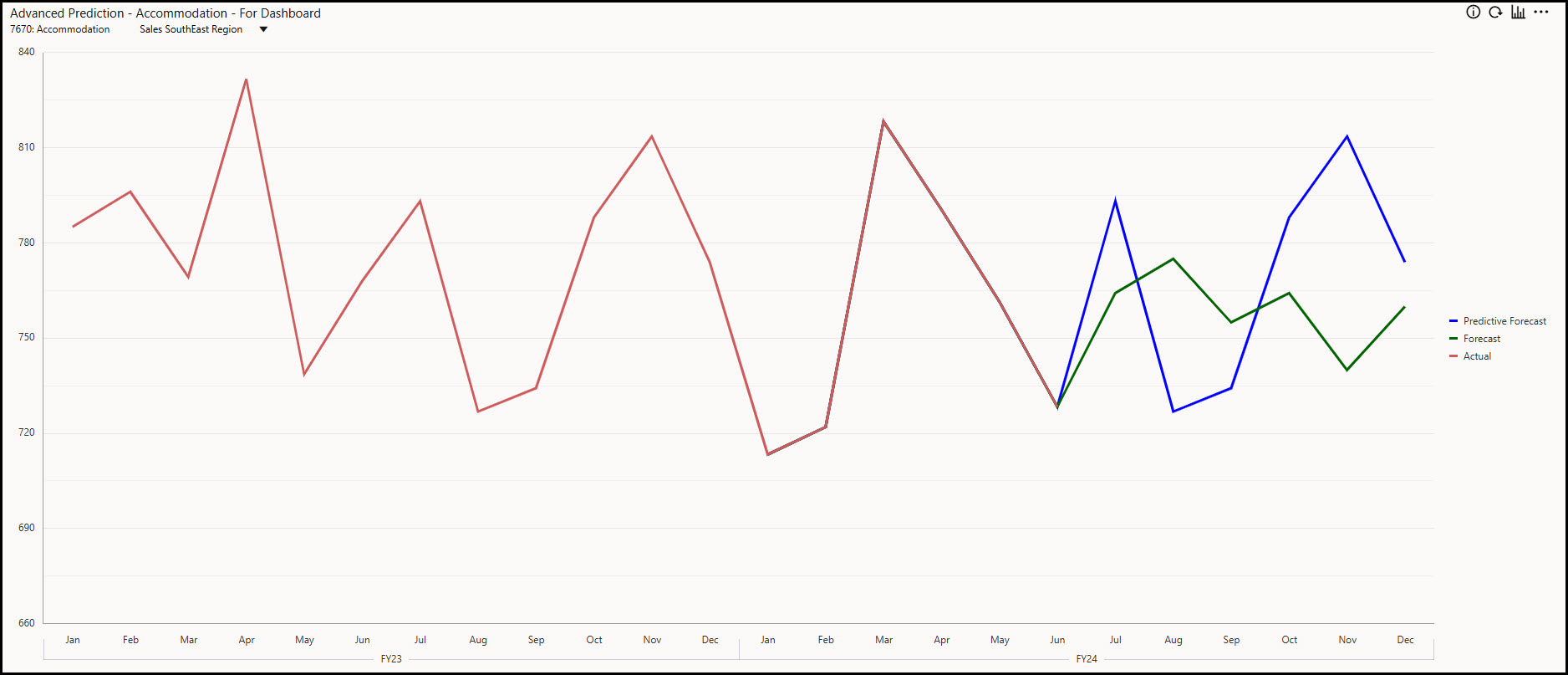
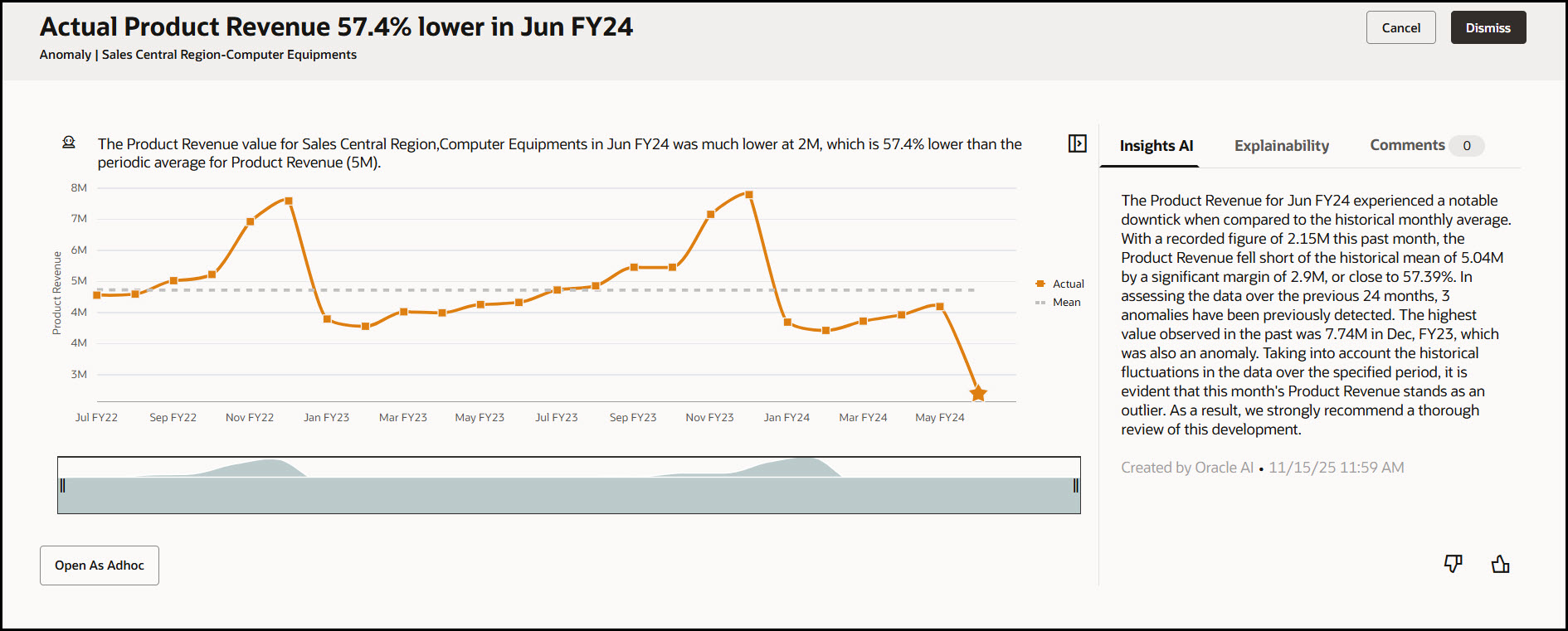
During this final phase of the pilot, you can use custom dashboards to visualize trends between actual, forecast, and predicted data. Within IPM, you can also configure Insights to automate data analysis. Insights can detect anomalies and use GenAI to provide narrative explanations for high-impact variances between IPM predictions and traditional forecasts.
Benefits Realized
By the end of Phase 3, Finance teams have reliable evidence of IPM’s accuracy. IPM predictions can replace the manual forecast process, and finance leaders can confidently expand predictive forecasting across the organization.
Repeat the three phases — prepare data, configure predictions, test and refine — to save time on every forecast and increase overall accuracy.
Oracle IPM Tips & Best Practices
At SC&H, we’ve refined this approach through multiple client implementations to deliver faster value and stronger results. A few lessons consistently stand out:
- Data density is key. Predictive models perform best with densely populated data sets. In some cases, that means generating predictions at a summarized level. For a franchised organization, this might mean predicting at the market level, rather than predicting revenue at each individual store.
- Automate testing whenever possible. Use Oracle Cloud EPM’s capabilities to automate back testing. Using Pipelines in Data Exchange to schedule predictions and/or string them together can significantly lighten the load on back testers.
- Continuous improvement of IPM. Use of Insights shouldn’t stop with parallel testing! Insights should be used actively to identify anomalies and spot forecast bias, which can help you continually refine your predictive modeling.
- Human involvement is still critical. Advanced Predictions will make forecasts easier to build and more accurate, but this doesn’t mean humans are removed from the process. Finance users should still be able to adjust results while maintaining traceability to the original prediction. IPM doesn’t remove human input — it gives you the space to focus on higher-value activities.
Get Off the Ground Faster with SC&H
Thinking about implementing IPM, but not sure you have the time to implement it on your own? Reach out today and we’ll help you implement, run your pilot, and see results faster.